

AI Analyst for Business: BI and Data Analytics
24/7/365 — your company analyst is always connected with you.
We build closed AI Analysts based on Google Cloud, Google BigQuery, Gemini, and Google Vertex AI.
Such an agent analyzes company data, answers business questions in simple language, builds tables and charts, and helps quickly identify growth opportunities, risks, and losses.
Those who already connect data and operational metrics into a unified analytics system today will make faster and more accurate decisions tomorrow.





Technologies we use
Demo chat with AI-analyst
The agent can analyze revenue, profit, order status, managers, products, categories, delivery, and traffic sources.
See best practices for better results. Please be aware that agents use your credentials to run queries. Responses may not be complete or accurate.
No longer need to wait
You simply ask a question — and receive an answer based on real company data.
The AI analyst analyzes company data, answers questions, builds tables and charts, and helps make decisions faster, more accurately, and based on facts.

Business benefits

Faster management decisions
Executives no longer wait for manual reports, Excel tables, or presentations. The AI analyst answers business questions directly.

Unified view of the business
Sales, CRM, advertising, finance, customers, managers, and operational metrics are combined into one flexible analytics system. Instead of fragmented data.

Facts instead of assumptions
The agent shows which products, channels, customers, managers, and processes actually generate profit — and where the business is losing money.

Analytics without overload
The team no longer needs to manually collect reports, check data, and explain basic metrics every time. The AI analyst generates answers, tables, and insights on its own.
More benefits
Data from all
systems in one chat
Instant answers
without manual report
Fast detection
of risks and losses
Analytics stack
by Google Cloud
Simple-language
dialogue with data
Charts and tables on demand
Finding profit
growth opportunities
Scaling together
with the business
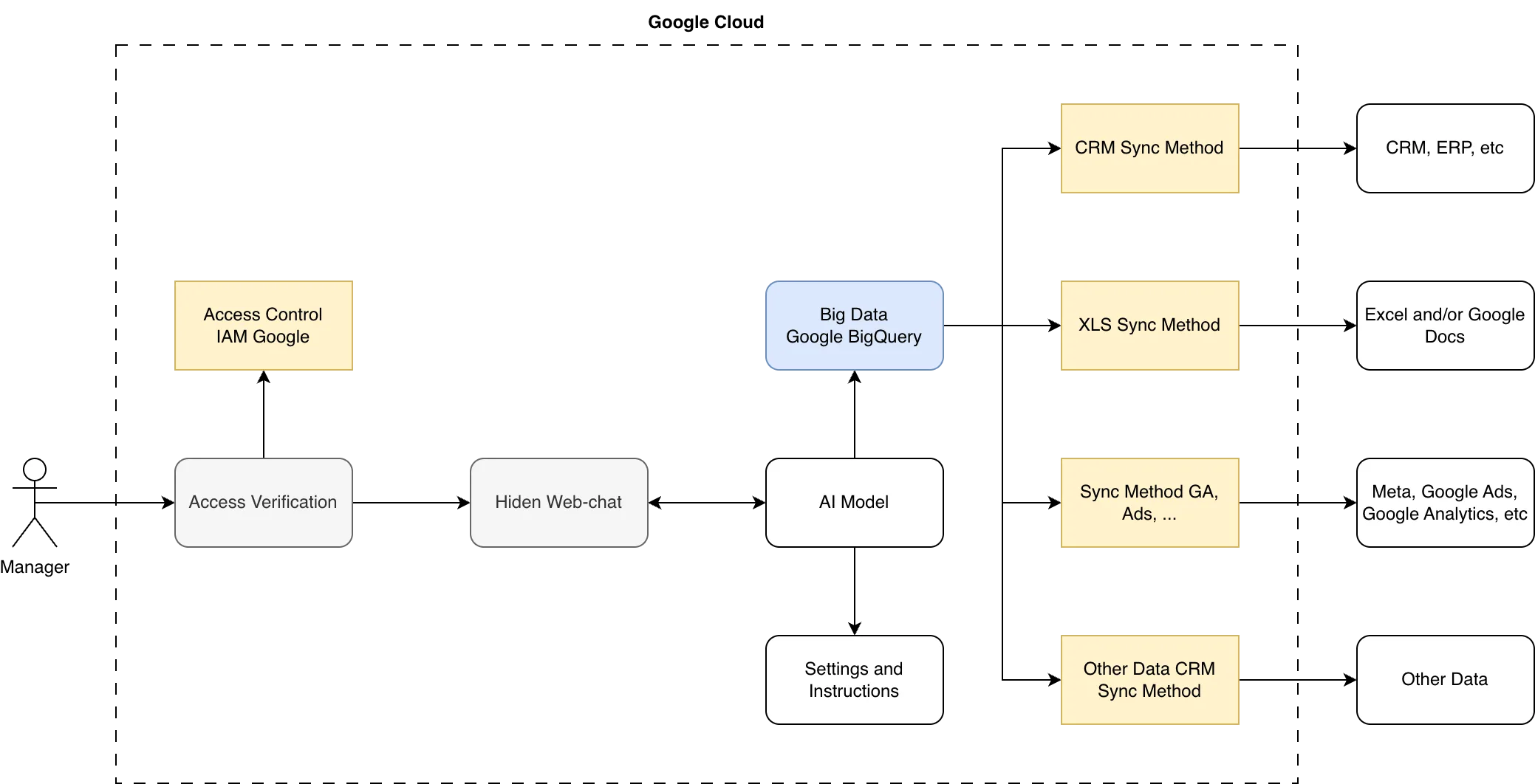
Architecture example
The diagram shows an example of the architecture and operating logic of an AI analyst. The actual solution is always adapted to the client’s business processes.
Implementation stages
The scheme is indicative.
Implementation stages are adapted to the specific client’s business processes and data sources.
Week 01
Analytics
Analysis of business goals, data sources, metrics, and scenarios
Week 02
Preparation
Infrastructure design
Start Integrations
Connecting CRM, XLS, Google Analytics, and other data sources
Week 03
Integrations
Connecting CRM, XLS, Google Analytics, and other data sources
Start Development
Creating the closed chat interface, model configuring, and setting up business logic
Week 04
Development
Creating the closed chat interface, model configuring, and setting up business logic
Start Testing
Checking data accuracy, agent responses, tables, charts, access roles, and analytical insights
Go-live
Support period
Testing
Checking data accuracy, agent responses, tables, charts, access roles, and analytical insights
Growth
Expanding functionality, adding new data sources and processes
Support
Pricing

Budget control
We start with a basic analytics layer and then gradually add new sources, scenarios, automated reports, and forecasts.

What affects the cost
- number of data sources
- integration complexity
- quality and structure of existing data
You invest in a system that turns company data
into faster and more accurate management decisions.

Cost benchmark
The cost depends on how much data needs to be connected, which systems need to be integrated, and what tasks the AI analyst must perform.
The base solution can be launched gradually — from one or two key data sources, without large upfront investments.