When a company reaches the point of thinking, “We need to implement AI,” the next question usually sounds like this:
“Okay. Where do we start?”
And this is where it is very easy to take the wrong path.
Buy a few licenses.
Connect a fashionable service.
Launch one AI pilot in every department.
Six months later, end up with a pile of different systems, subscriptions, several nice presentations, and almost the same processes as before — only now with an AI note attached somewhere on the side.
That is why proper AI implementation does not start with choosing a model.
It starts with a complete analysis of how the company actually works.
First, You Need to See the Whole Picture
A company may have dozens or hundreds of processes, and almost every one of them can be automated to some extent.
But that does not mean everything should be automated at once.
First, you need to run an audit and understand:
where the largest amount of routine work happens;
where people constantly repeat the same actions;
where delays and errors occur;
where data is transferred manually between systems;
where the process depends on a specific employee;
and finally, where automation will create the biggest business impact.
This is an important point.
AI should not be implemented where it looks fashionable or technically interesting.
It should be implemented where the company will actually feel the result.
The First AI Project Should Remove a Real Pain Point
Imagine a sales department.
Every day, managers:
answer the same customer questions;
look for prices and product specifications;
check availability;
prepare similar commercial proposals;
copy information into CRM, out of CRM, through CRM, around CRM…
pass the same data further through the process.
Each individual action does not take much time, but together the company spends a huge amount of resources on routine work.
That is already a good candidate for automation.
The system can take over request handling, data collection, initial proposal preparation, checks, data transfer between systems, and even communication with the customer, for example by email.
And this creates a double effect.
The company gets a faster and more stable process.
And people stop spending a large part of their day on work that no longer really requires a person.
A Good Result Is When the Team Says “Thank You”
For us, this is one of the best indicators of a successful implementation.
Not only an ROI chart.
Not only the number of automated operations.
But a simple reaction from an employee:
“Finally, we do not have to do this manually anymore.”
That is why the client’s team needs to be involved already at the audit stage.
Management sees the process from above.
The people who work inside it every day see it from the inside.
They know very precisely:
what is most frustrating;
where time is being lost;
which actions are repeated dozens of times;
where errors happen most often;
what could have been automated a long time ago.
And there is another important effect.
When the team itself helps identify the problem and design the future solution, resistance to change becomes much lower.
It is no longer “management has brought us another new system.”
It is a solution that removes a specific pain point the team itself helped identify.
After the Audit, You Need an Opportunity Map — Not a List of Fashionable Ideas
The next step is to collect potential scenarios and evaluate them properly.
For example, by criteria such as:
expected business impact;
amount of manual work;
process frequency;
number of people involved;
cost of error;
data readiness;
integration complexity;
cost and speed of implementation;
and so on.
After that, it becomes much clearer where the company should really start.
In one area, a few months of work may remove hundreds of hours of manual effort.
In another, the company may spend a year building a beautiful AI feature that will be used twice a month.
We prefer the first option.
Do Not Be Afraid of Strange Processes and Old Systems
Real business almost never looks like this:
CRM → AI → result.
More often, it looks something like this:
ERP → Excel → email → old database → manager → PDF → another system → back to ERP.
And somewhere in the middle there is a person who “knows what to do when something goes wrong.”
For us, this is not a problem.
If the process is already digital, it can be automated and enhanced with AI.
Through APIs.
Through databases.
Through workflow platforms.
Through a dedicated integration layer.
Through local, cloud, or hybrid architecture.
And if the process has not been digitized yet, it can be digitized first.
This is not a wall.
It is simply another important stage of the work.
Sometimes the Right Solution Is Not to Use AI at All
We are convinced that not every automation should be AI-powered.
If a task can be handled reliably with a standard algorithm, rule, or API, that is usually exactly what should be used.
AI makes sense where it is genuinely needed:
working with unstructured text;
document analysis;
request classification;
searching for and matching context;
working with large volumes of information;
natural language interaction;
supporting complex decisions.
That is why in a good AI solution, “pure AI” may account for only around 20%.
The rest is data, logic, integrations, algorithms, validation, security, and solid engineering work.
Start Gradually
A proper AI transformation should not look like “let’s implement AI everywhere by the end of the quarter.”
A better approach is:
1. Audit. Understand the processes, systems, data, and problem areas.
2. Opportunity map. Identify where automation or AI can create the greatest impact.
3. Prioritization. Choose the first scenario with the best balance between value and complexity.
4. Pilot. Build a working solution around a real process.
5. Validate it with the team. Check whether the process has actually become faster, simpler, and better.
6. Scale. Move on to the next processes based on real experience.
This way, the budget is not spent on ticking the box “we also have AI.”
It is spent on gradually improving the company’s operating model.
Conclusion
There is a simple answer to the question “Where should we start with AI implementation in the company?”
Not with AI.
Start with the company.
Look at its processes, systems, data, and people.
Find the routine.
Find the losses.
Find the process where automation can create the greatest impact.
Make it better.
Let the system take over the mechanical work.
And let the team say:
“Thank you.”
Then move on to the next process.
That is how AI transformation turns from a collection of experiments into a controlled development program for the company.
FAQ: Where to Start with AI Implementation in a Company
What Is the Best Place to Start an AI Transformation?
Start with an audit of business processes, systems, and data. First, you need to see the company as a whole and identify the processes where automation can create the greatest business impact.
Should AI Be Implemented in Every Department at Once?
No. It is more practical to start with one or several priority scenarios, measure the result, and only then gradually scale the solution.
How Do You Choose the First Process to Automate?
A strong candidate usually involves a large amount of repetitive manual work, happens frequently, involves many people, has a clear outcome, and allows the company to measure time savings, cost savings, or error reduction.
What If the Process Has Not Been Digitized Yet?
First, the process should be formalized and moved into a digital environment. After that, repetitive stages can be automated and AI can be added where it genuinely provides value.
Why Should Employees Be Involved in the Audit?
The people who work with the process every day understand its real routine, exceptions, and bottlenecks better than anyone else. Their involvement helps identify more useful scenarios and increases motivation to use the new solution.
Does Every Automation Need AI?
No. Some tasks are better handled with standard algorithms, APIs, and business rules. AI is most useful when the process requires work with text, documents, context, large volumes of information, or natural language interaction.
When a company decides to implement artificial intelligence, there is a strong temptation to start with something impressive.
Choose a model.
Connect a fashionable service.
Show a presentation filled with trendy phrases such as “AI-powered transformation.”
And then discover that employees are still manually moving data between three spreadsheets, a manager checks CRM statuses twice a day, accounting receives documents in five different formats, and the CEO still asks:
“What’s the status?”
Because AI implementation in business processes does not begin with choosing a language model. It begins with understanding how the company actually works.
Not how the process is beautifully illustrated in the official procedure.
Not how the head of the department describes it during meetings.
But how people actually receive requests, check data, make decisions, hand over tasks, correct mistakes, search for documents, and rescue the process when the latest file is called final_v8_really_final_NEW_2.xlsx.
Do Not Simply Add an AI Service to an Existing Process
One of the most common mistakes is treating AI as a separate feature that can simply be attached to an existing workflow.
There was a process without AI.
Then someone added a “Do it with AI” button.
They connected an online AI service that creates a summary in yet another spreadsheet.
Now, formally speaking, the process has become innovative.
But if the process was chaotic, slow, or incomplete before that, artificial intelligence will not necessarily save it.
More precisely, it definitely will not save it.
…
A proper implementation therefore begins with three questions:
how does the process work now;
where does it hurt — where are time, money, resources, and people’s attention being lost;
how should it work so that it no longer hurts.
First, the process needs to be broken down into its components.
Then, where necessary, some order needs to be introduced.
Only after that should the company decide where it needs an algorithm, an integration, a simple automation, or actual artificial intelligence.
Every Company Has Its Own Business Processes
Two companies may sell the same products, operate in the same city, and employ approximately the same number of people.
But internally, they may work in completely different ways.
In one company, an order automatically moves from the website to the ERP system, and notifications are sent to the responsible employees.
In another, a manager first receives the order by email, copies it into Excel, checks availability in a chat, calls the warehouse, and only then adds it to a Google spreadsheet.
In one company, discounts are calculated according to clearly defined rules.
In another, a more sophisticated formula applies:
“Ask Sergey. If Sergey does not reply, ask Olena. But for long-term clients, it is better not to change anything without the director. And it is better to call him because he does not read the group chats.”
This is exactly why a universal ready-made solution is simply impossible.
It is designed around a typical process.
Real company processes are rarely typical.
They include:
their own rules;
exceptions;
roles and levels of responsibility;
legacy systems;
informal agreements;
specific data formats;
logic that has developed historically within that particular company and may now be impossible to rebuild completely.
A company’s business process should not have to adapt to the limitations of an off-the-shelf AI service.
The solution should be built around how the company actually works — or how it should work after optimisation.
An Off-the-Shelf Product Often Solves the Wrong Problem
Off-the-shelf SaaS solutions can be useful.
Especially when the process is standard, the requirements are simple, and the company is willing to work exactly as the service developer intended.
And when the total cost over the next couple of years, including all additional components and users, is not frightening.
But questions appear very quickly:
what should we do with our non-standard statuses;
how do we connect our legacy ERP;
can the system check data across several systems at once;
how do we account for our exceptions;
can we change the orchestration logic;
how do we restrict access for different roles;
where will the additional data be stored;
what happens if our process has ten steps but the service supports only three.
At that point, the company either starts rebuilding its process around the service or creates dozens of manual workarounds around it.
As a result, the automation that was supposed to eliminate routine work creates new routine work.
I have seen companies with more than 150 IT systems.
Once again.
MORE THAN ONE HUNDRED AND FIFTY SYSTEMS.
They appeared gradually.
Each new system partially solved something the previous one had failed to solve.
The right approach works the other way around.
First, the target process is designed.
Then the components required to support that process are identified.
Only after that are the technologies selected.
The First Stage Is to Understand How the Company Really Works
This is similar to medicine. The first step is diagnosis.
First, you need to understand the problem.
For that purpose, we study:
how the process starts;
what data it receives as input;
who participates at each stage;
what decisions are made;
where people wait for information;
where data is transferred manually;
where mistakes occur;
what is most frequently returned for revision;
which systems are used;
what a successful process result should look like.
And so on.
The Client’s Team Knows Where It Hurts
Managers see the process from above.
Employees see it from the inside.
And the people who perform the work every day usually know very precisely where it hurts:
which actions are repeated dozens of times;
which data constantly needs to be copied;
where errors occur most often;
what causes the most frustration;
which tasks consume a lot of time while creating almost no value;
where the process regularly stops;
what could have been automated a long time ago, but nobody ever had the time to do it;
and so on.
That is why the client’s team should not be involved only at the end, when they are formally presented with the finished system.
They should be involved from the very beginning.
This creates a double effect.
First, the team identifies the real bottlenecks with a high degree of accuracy.
Not the ones that look attractive in a presentation, but the ones that consume time and energy every day.
Second, people see that they have been heard and become highly motivated to work with solutions they helped design.
And when the new solution removes exactly the work that has frustrated and demotivated them for years, their attitude towards the implementation changes dramatically.
Instead of:
“Management has invented another new system.”
You hear:
“Finally, we do not have to do this manually anymore.”
This is one of the strongest factors behind a successful implementation.
Not Every Routine Task Should Be Given to AI
One sign of genuine AI expertise is not trying to insert AI into every step. Like in that joke about apples…
If a task can be solved reliably with a simple rule, there is no need to ask a language model to make a ceremonial decision.
If data can be transferred through an API, a “smart agent” is not required.
If the result is determined by a formula, it is better to use the formula.
AI should be used where the system needs to:
understand unstructured text;
work with documents;
classify non-standard requests;
extract entities and conditions;
summarise large volumes of information;
communicate with users in natural language;
“communicate” with data;
compare complex contexts;
help people make decisions.
In other parts of the solution, ordinary algorithms and rules may be more appropriate.
Sometimes only around 20% of a good solution is “pure AI.”
And that is perfectly normal.
The rest is what makes the system manageable, reliable, and suitable for real business operations.
Why an AI Solution Is Often 80% Not AI
Suppose a company wants to automate the processing of incoming orders.
AI can:
understand the content of an email;
extract product names;
understand the customer’s requirements;
determine urgency;
prepare an initial response.
But for the process to actually work, the system must also:
check the customer in the CRM;
verify prices;
retrieve stock availability from the ERP;
apply discount rules;
check the credit limit;
create the order;
send it to the warehouse;
record every action;
notify the responsible manager;
handle exceptions and errors.
So AI is important here.
But without a proper system architecture, it remains little more than a very intelligent email reader.
What it needs to become is the conductor of several important functions.
That is why AI implementation is not only about working with a model.
It also includes:
improving processes;
systematising data;
cleaning data;
designing algorithms;
building integrations;
security;
quality control;
user preparation;
post-launch support.
Start Where the Business Will Receive the Greatest Benefit
Not all processes are equally important.
And not everything should be automated simply because it can be.
A company can spend several months building an attractive AI assistant that answers three simple questions once a week.
Or it can use the same time to eliminate a manual operation performed every day by twenty employees.
Or automate first-line customer support responses 24/7/365.
That is why scenarios need to be evaluated according to several factors:
how much time is currently being spent;
how many people participate;
what an error costs;
how frequently the process is performed;
how strongly it affects the customer;
whether the necessary data is available;
how complex the integration will be;
how quickly a measurable result can be achieved.
The first scenarios to launch should combine:
a large volume of manual work;
frequent repetition;
a high cost of delay or error;
sufficient data quality;
a clear business benefit.
Do not start where it looks most fashionable.
Start where the company will genuinely feel the difference.
The Technology Stack Should Depend on the Company, Not the Contractor
Another common problem arises when a contractor knows how to work with only one technology stack and tries to explain why it is the perfect choice for absolutely everyone.
The company uses Microsoft 365, Azure, SharePoint, Dynamics, and corporate Active Directory?
It is advised to move everything to another cloud because “that is more convenient for us.”
The company has strict requirements for local data storage?
It is offered an external SaaS product because “it can be launched quickly.”
The company needs a simple workflow?
It receives a complex AI platform because the contractor’s team likes complex AI platforms.
That is not how it should work.
Technologies should be selected according to the client’s infrastructure, processes, security requirements, budget, and internal competencies.
A solution can be built:
on Google Cloud if the company already uses the Google ecosystem;
on Microsoft Azure if the business operates in a Microsoft environment;
on AWS if the company’s main infrastructure is already hosted there;
with n8n or other workflow platforms for suitable scenarios;
on local infrastructure where security or regulatory requirements demand it;
using a hybrid architecture where some data remains local and some is processed in the cloud;
using different AI models depending on the task.
Real expertise is not about selling the same technology stack to everyone.
It is about building the right architecture for a specific company.
The AI Model Is a Replaceable Component, Not the Entire Product
Models change quickly.
Today, one model may work better with documents.
Another may perform better with code.
A third may be cheaper for high-volume requests.
A fourth may be able to run locally.
A strong architecture should therefore not make an entire business process dependent on one specific model simply because it was popular when the solution was launched.
It is better to build the system so that:
models can be replaced;
different tasks can use different models;
critical business logic does not depend on an AI-generated text response;
results pass validation checks;
usage costs remain controlled;
data stays within the permitted environment.
Because the goal is not to build a monument to one particular technology.
The goal is to create a system that continues to deliver value even as the technology changes.
Implementation Does Not End on Launch Day
After launch, real users very quickly discover scenarios that nobody considered during the design stage.
They ask unexpected questions.
They use the system slightly differently from how it was intended.
They find new exceptions.
They show where an answer is not accurate enough.
Sometimes they even accidentally discover a more useful scenario than the one the system was originally built for.
That is why the post-launch stage requires:
monitoring;
request analysis;
result quality evaluation;
error control;
source updates;
rule adjustments;
development of new scenarios.
AI implementation is not a one-time installation.
It is the ongoing development of a new operational environment for the company.
This Is Not About Replacing People
The strongest effect often appears not when a system replaces an entire position.
It appears when the system removes from that position the work that should no longer require a person.
Searching for information across ten systems.
Transferring the same data.
Checking the same fields.
Combining spreadsheets.
Copying statuses.
Preparing standard responses.
Reconstructing context.
People remain responsible for the areas where the business needs:
accountability;
negotiation;
risk assessment;
non-standard decisions;
empathy;
understanding of the business context;
final control.
The system takes over the mechanical part.
And this does more than improve productivity.
It often gives people back the feeling that they are doing meaningful professional work rather than maintaining an endless conveyor belt of copied data.
Conclusion
AI implementation in business processes is systematic work.
The company needs to examine its real processes, identify pain points and routine work, revise the logic of the process where necessary, prepare the data, involve the team, and identify the scenarios with the greatest business impact.
Only after that should technologies be selected, remembering that different models and tools are suitable for different tasks.
Because the technology stack is a means.
The goal is to build a process that works faster, more accurately, and more effectively for a specific company.
In some solutions, AI itself may account for only 20%.
The rest consists of data, algorithms, integrations, rules, controls, and proper engineering work.
That is exactly what separates a real implementation from an attractive demonstration.
It begins with analysing the company’s real business processes, data, systems, and the problems experienced by its team. The company first needs to understand where time is being lost, where manual work occurs, and where errors appear. Only after that should AI technologies be selected.
Can a Company Buy One Ready-Made AI Solution for All Its Processes?
Ready-made services can work well for standard tasks. But complex processes usually have their own rules, exceptions, roles, and integrations. The solution therefore needs to be adapted to how the company actually works.
Is Google Cloud Required?
No. The architecture can be built on Google Cloud, Microsoft Azure, AWS, local infrastructure, or a hybrid environment. The choice depends on the company’s existing technology environment, security requirements, budget, and business needs.
Can the Solution Run Locally?
Yes. If the company has strict confidentiality requirements or cannot transfer certain data to external cloud platforms, it can use a local or hybrid architecture together with suitable AI models.
Why Might AI Account for Only 20% of an AI Solution?
Because stable operation also requires data preparation, algorithms, integrations, APIs, business rules, validation, access permissions, monitoring, and error handling. The model is an important component, but it is not the entire system.
How Should a Company Choose the First Process to Automate?
It is best to begin with a process that is repeated frequently, consumes a large amount of working time, has a high cost of error, and can produce a clear and measurable result.
Why Should Employees Be Involved in the Design Process?
Employees understand the real problems, recurring routine work, and informal exceptions within the process better than anyone else. Their participation helps create a more useful solution and significantly increases the team’s motivation to use it after launch.
Does AI Replace Employees?
In most cases, the solution does not replace a person completely. Instead, it takes over searching, data transfer, checks, material preparation, and other mechanical work. People retain control, responsibility, and the authority to make critical decisions.
Until recently, management analytics in many companies looked more or less the same. Someone pulled the numbers together. Someone merged Excel files. Someone extracted data from the CRM. Someone prepared the report. And only after all that did the manager finally look at the result and try to understand what was actually happening in the business.
It sounds familiar. Even respectable. But if we are being honest, it is a very slow and not particularly flexible model of management analytics.
Because by the time the report is ready, part of the situation has already changed. By the time the dashboard refreshes, someone has already made a decision based on intuition. By the time an employee manually checks the numbers, the data may already contain mistakes, distortions, or simply the wrong angle of analysis.
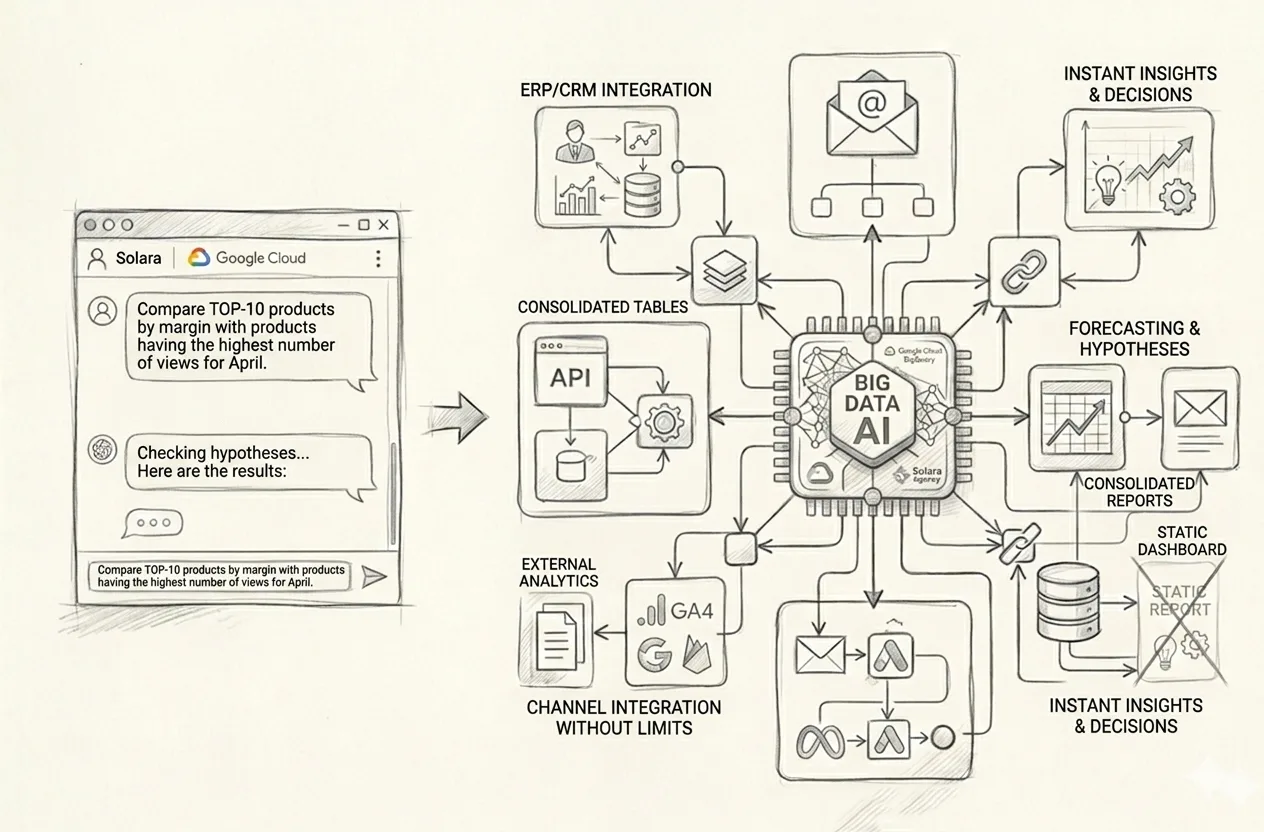
That is exactly why the market is gradually moving from manual reports, CRM funnels, and static dashboards to a personal AI Analyst for business — a system you do not just look at, but actually talk to.
You are no longer waiting for the next report. You are not searching for the right filter in the tenth dashboard. You are not going back to the team with “can you make one more cut of the data, just slightly differently.” You simply ask questions of the company’s real Big Data and immediately receive answers, tables, charts, comparisons, conclusions, and new analytical angles.
Where Reports End and the AI Analyst Begins
A traditional report shows what was prepared in advance. A dashboard does the same. It may be beautiful, complex, expensive, colorful, and even look impressive in a meeting. But the core idea does not change: you are looking at a pre-built slice of data.
An AI Analyst for business works differently. You are not just looking at a ready-made picture. You are asking any business question you want against the company’s data and turning that data around from different angles in a live dialogue.
So the difference is quite simple:
A report shows what someone prepared in advance.
A dashboard shows what was designed into it within a specific visualization logic.
An AI Analyst allows you to ask new questions, combine conditions, detect anomalies, build comparisons, tables, charts, and management conclusions in real time.
And this is where it gets interesting. Because in a real business, a manager almost never stops at one simple question. They need to test a decision from several angles, quickly change the angle of analysis, refine a hypothesis, compare different slices, and see not just a number, but a cause-and-effect picture.
Why Reports, Funnels, and Static Dashboards Are No Longer Enough
The problem with reports is not that they are useless. The problem is that they are almost always slower than the speed of management decisions.
The problem with dashboards is not that they are bad. The problem is that they show exactly what someone once decided they should show.
But a business does not operate in a mode where you just look at three charts and calm down. A business lives in a mode of constant follow-up questions:
why one channel brought a lot of traffic but little revenue;
why one product sells well while a similar one next to it sits there like dead weight;
why one manager has strong revenue but weak margin;
why the funnel looks fine, yet profit is not growing;
where exactly money is being lost even though everything looks decent at the top level.
And this is exactly where a static dashboard starts hitting its ceiling. Because it does not think with you. It cannot rebuild the analytical logic on the fly. It does not give you a real dialogue with the data. It simply stands there and shows what it was built to show.
An AI Analyst for business becomes valuable precisely at the point where it is no longer enough for a manager to merely look at data — they need to talk to it.
What a Personal AI Analyst Actually Delivers
A strong AI Analyst is not “just another AI chat.” It is an interface for access to the company’s real management analytics, consolidated from multiple sources into one analytical environment.
This system may include:
internal company systems;
CRM;
ERP;
Excel and Google Sheets;
order and sales databases;
Google Analytics and other web analytics systems;
advertising platforms;
financial spreadsheets;
operational data;
any other sources that matter for management analysis.
And then the interesting part begins — the part that traditional reports usually do not handle very well.
You can ask complex, practical, normal business questions such as:
find the top 10 products that sold best in April and show their revenue, margin, and share of repeat purchases;
now compare them with the 10 products that had the highest number of views but no purchases, and show the difference in margin, price, traffic sources, and landing pages;
find categories where ad spend is increasing but profit is not;
show managers with the highest number of deals but lower average profit per order than the team average;
find cities or regions where demand is high but conversion to payment is weak;
compare advertising campaigns that generate cheap leads with campaigns that generate better margin on actual orders;
find customer segments where acquisition cost is already destroying the unit economics;
build a month-by-month sales chart and overlay changes in advertising spend to see the lag between investment and result;
forecast demand by key categories if the current pace continues for another 8 weeks;
find where money is being lost between product view, add to cart, payment, and actual profit.
And the most important thing here is not that the system “knows the answer.” The important thing is that you can immediately ask the second, third, fourth, and fifth question — without waiting for a new report tomorrow or next week.
Why Standard Dashboards Do Not Surface This
A dashboard is good right up to the point where the set of cuts it contains is enough for you. But business decisions almost never stop on the first screen.
A manager sees a margin drop. Then they want to understand whether the problem is products, channels, or managers. Then they want to see only new customers. Then only certain regions. Then they want to overlay advertising data. Then look at returns. Then compare it with the previous quarter. Then identify outliers. Then get a short management conclusion.
This is where the report starts breathing heavily, and the dashboard just stares back with its pre-built charts and offers nothing new.
An AI Analyst wins on flexibility. You are not tied to one pre-defined viewing scenario. You carry on a dialogue with the data and test management hypotheses in real time.
Speed and Accuracy of Management Decisions
One of the biggest advantages of this model is speed.
When management analytics depends on manual preparation, there is always a delay in the business between the question and the answer. And together with that delay come:
decisions based on intuition;
unchecked hypotheses;
lost time;
human error in report preparation;
the habit of looking only at the “standard set of KPIs.”
When a manager has a personal AI Analyst, they can instantly test decisions from different angles. Not through the long chain of “asked — waited — assembled — clarified — reassembled,” but directly.
And that is not just convenient. It genuinely changes the quality of management decisions.
Because speed in this kind of analytics is not about rushing. It is about making a good decision while the data is still alive, not when it has already ended up in a presentation that is three days old.
An AI Analyst Is Like a Strong Analyst on the Team — Only Much Faster
This is probably one of the clearest analogies.
A good AI Analyst for business works like a qualified analyst in the team:
understands questions in plain language;
finds the relevant data;
builds tables;
creates charts;
produces comparisons;
highlights anomalies;
helps identify risks, losses, and growth opportunities;
can produce a short conclusion or suggest a new analytical angle.
But at the same time, it does not get tired, does not manually combine ten different files, does not get lost between spreadsheet tabs, and does not prepare the report “for tomorrow” if the question can be checked right now.
And this does not mean AI fully replaces the team. It means the team stops drowning in routine work and can focus on what actually requires human managerial and analytical thinking.
Why the Combination of Google Cloud + BigQuery + Gemini + Vertex AI Is So Strong Here
If we speak practically, the strength of this approach is not in some abstract “we also added AI.” The strength is that with Google Cloud and BigQuery, you can build a closed analytical environment where large volumes of data from different sources begin to work as a single system.
BigQuery provides the foundation for scalable work with large datasets and fast analytical access to them. On top of that comes the Gemini / Vertex AI layer, which enables natural-language interaction with the data, complex questioning, explanations, tables, charts, and analytical conclusions.
So this is not about “yet another dashboard.” And not about “yet another BI wrapper.” It is about your data beginning to speak with you properly — quickly, flexibly, and in the format of a management dialogue.
You Do Not Adapt to the Report. Analytics Adapts to Your Question
This is probably the main point of the whole topic.
In the old model, a manager looks at a report or dashboard and tries to squeeze their real question into the format they have already been given.
In the new model, everything works the other way around: management analytics adapts to your real question.
Do you want to see the products with the best margin among those that convert worst from product view to purchase? No problem.
Do you want to compare advertising campaigns not by lead volume, but by actual profit after returns and logistics costs? Fine.
Do you want to check which managers drive revenue and which ones drive real profit? Also possible.
That is why a personal AI Analyst is not “just another reporting tool.” It is already an element of modern management infrastructure.
What This Means for Business in Practice
For business, this means one very simple thing: the era when all management analytics depended on manual reports, scattered Excel files, static funnels, and a familiar set of dashboards is gradually coming to an end.
Yes, reports will still be needed. Yes, BI is not going anywhere. But the real advantage will now belong to companies that can:
consolidate data from all their systems into one analytical environment;
ask any business question against that data in plain language;
receive tables, charts, conclusions, and forecasts immediately;
test management decisions from different angles very quickly;
identify growth points, risks, and losses without a long manual analytics cycle.
Conclusion
The shift from reports, CRM funnels, and static dashboards to a personal AI Analyst is not a fashion trend and not some attractive digital gimmick.
It is the natural next step for businesses that want to make decisions faster, more accurately, and on the basis of the company’s real data — not on intuition, delayed reporting, or the limitations of pre-built data views.
An AI Analyst for business is not just “another AI chat.” It is a way to turn the company’s real Big Data into a conversational management tool.
And this is exactly where the difference becomes visible between analytics that people merely look at and analytics they can actually work with.
FAQ: AI Analyst for Business in Brief
How is an AI Analyst different from a dashboard?
A dashboard shows pre-defined slices of data. An AI Analyst lets you ask new questions against company data in plain language, combine conditions, build tables, charts, comparisons, and receive management conclusions in real time.
Does an AI Analyst replace a BI system?
Not necessarily. More often, it complements the BI layer and introduces a new way of interacting with data. Where a dashboard shows static views, an AI Analyst enables flexible dialogue and new analytical angles.
What data can be connected to an AI Analyst?
Internal systems, CRM, ERP, Excel, Google Sheets, sales databases, financial spreadsheets, web analytics, advertising systems, and other sources that matter for the business’s management analytics.
What kinds of questions can you ask an AI Analyst?
Almost any management question: about sales, margin, channels, categories, managers, customers, repeat purchases, advertising efficiency, regions, anomalies, risks, losses, forecasts, and growth points.
Reality: intuition doesn’t show real demand, volumes, competition, or market trends.
“Analytics is slow and expensive.”
Reality: skipping analytics becomes far more expensive after launch—and our approach is significantly more affordable than traditional research formats.
“A user survey is enough.”
Reality: surveys capture opinions, not real market behavior.
“If the product is offline, online analytics isn’t needed.”
Reality: demand and competitors still exist and are shaped online.
“Analytics is only for confirming an idea.”
Reality: analytics often reveals insights that force you to revisit initial assumptions.